mcpock 1.18 — the tools nobody calls
mcpock 1.18 hides single tools even in agents that have no setting for it, shows which tools went unused for 30 days, and got a calmer face. Free and open source.
Every MCP server I add hands its whole tool list to my agents. A server for issues brings tools to list them, create them, update them, search them and archive a whole project. I have never archived a whole project from a chat. The tool still comes along, every session.
That is the part people don't see. An agent puts the tools it loads into the model's context before I type anything. Most agents send each tool's name, its description and the shape of what it takes. Claude Code can hold the descriptions back until a tool is needed (its tool search), but the names still go in. So a tool nobody calls is not free. It takes context and tokens in every session, and it gives the model one more wrong option to pick.
mcpock 1.18 is mostly about getting those tools out of the way.
Which tools I actually use
Turn on Usage counts in Settings > General, and mcpock reads how many times each tool was called, from Claude Code, Grok, Cursor and Hermes history on the Mac. Last 7 days, last 30, or all time. It is off until you turn it on, because it reads chat history, and the counts never leave the Mac.
A server's card then lists its tools with a switch beside each one, the most used first with their calls. The ones nobody called in the window sit in one fold, "Not used in 30 days", with a Hide all button. The hidden ones fold at the end, with Show all.
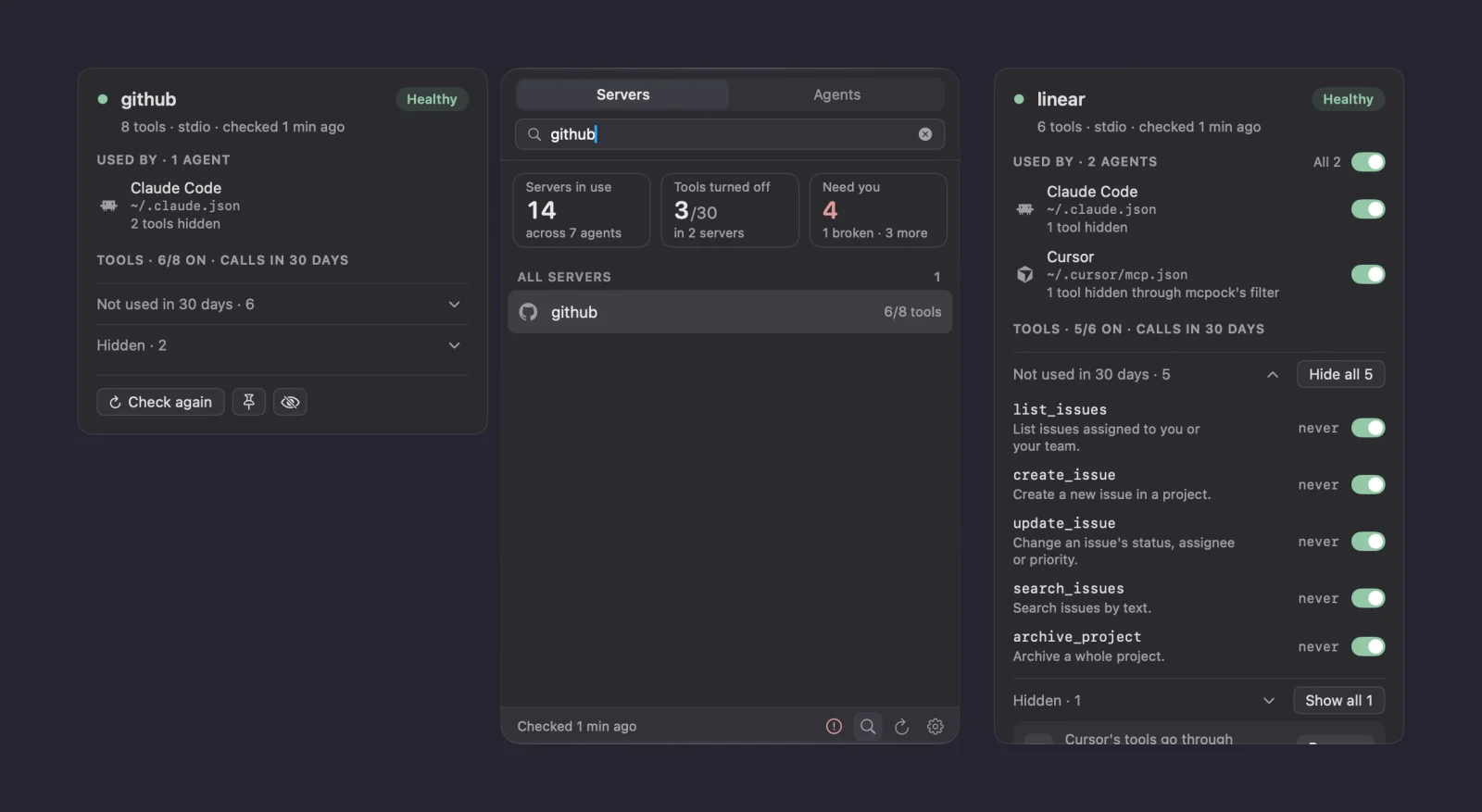
On my Mac, on 22 Nov, Claude Code had made 9,990 calls in 30 days to the 35 servers on its list, and 149 of my 388 tools were turned off. Those numbers move every day; the pictures here are demo data.
I didn't put a token number in this post. It depends on the server, the agent and the model, and mcpock doesn't count tokens. It counts calls, and a tool with zero calls in 30 days is an easy one to let go.
Hiding one tool where the agent can't
Hiding a tool is easy in agents that have a setting for it. Claude Code has its deny lists, Codex, Grok, Goose, Hermes and OpenCode have disabled_tools, and mcpock writes to those.
Cursor, Claude Desktop, VS Code, Cline and Windsurf have no such setting. You can turn a whole server off there, or keep all of its tools. That was it.
For those, 1.18 adds mcpock's filter. The card says "Cursor can't hide single tools. mcpock's filter can." and offers Set up. After that, the agent starts mcpock's small helper, the helper starts the server and leaves out the tools you turned off. The server's own command, arguments and keys stay in the entry, word for word. Remove puts the entry back as it was.
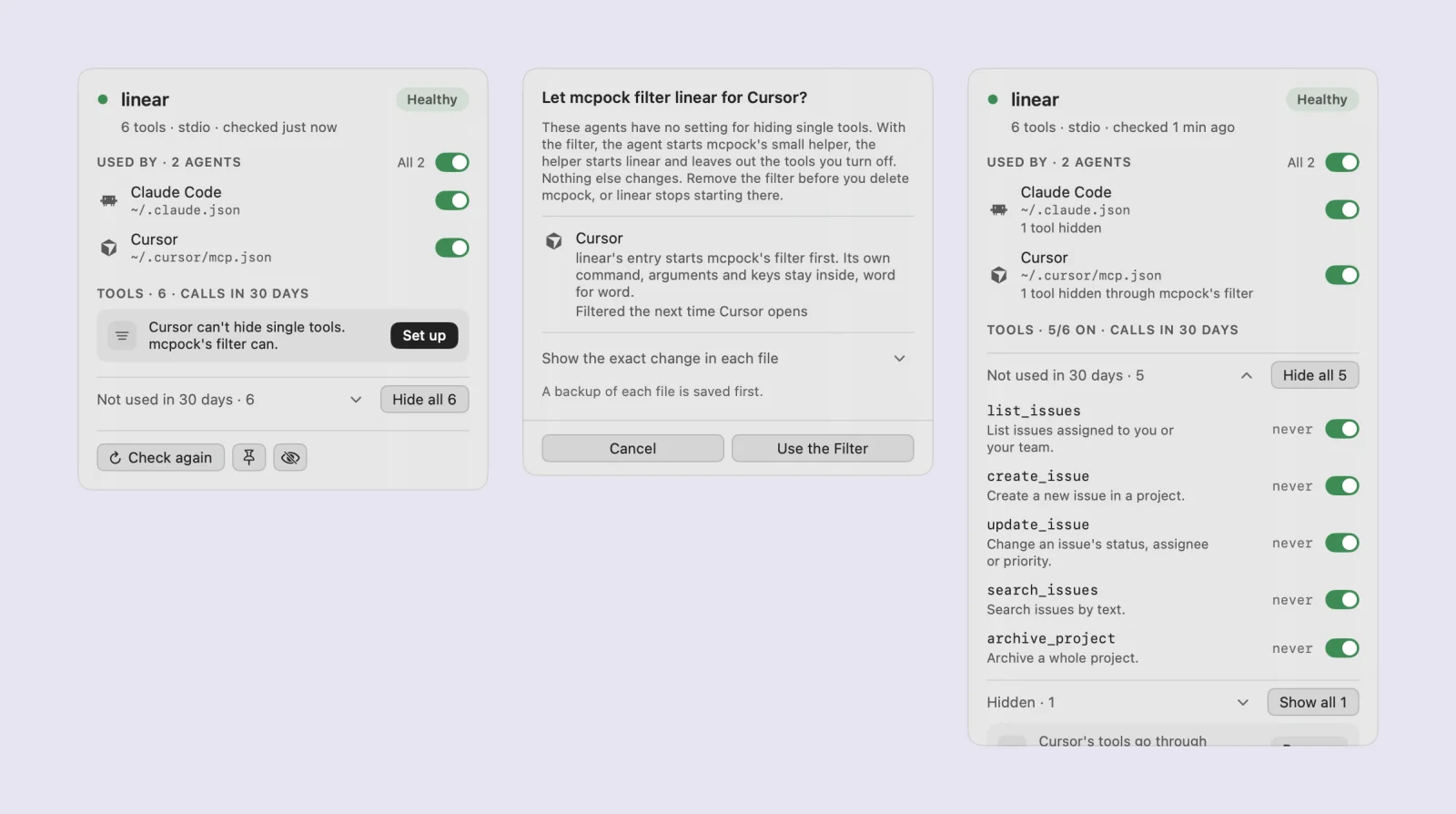
Two things to know. The filter works for servers that run as a command, not for remote ones. And its entry holds the path to mcpock.app, so remove the filter before you delete mcpock, or that agent can't start the server anymore (mcpock shows it as broken and says why).
Nothing changes without a yes
Every switch opens a sheet first: what changes in which file, and when it counts ("filtered the next time Cursor opens"). mcpock saves a backup of each file before it writes. A server you turn off in an agent with no off setting waits in mcpock's own folder and goes back to the same place in the file when you turn it on.
Agents can't flip the switches. Through mcpock's own MCP server they can only ask, with a reason, and the ask waits on the server's card with Yes and No. So an agent can say "you never use these five" and I still decide.
The rest of 1.18
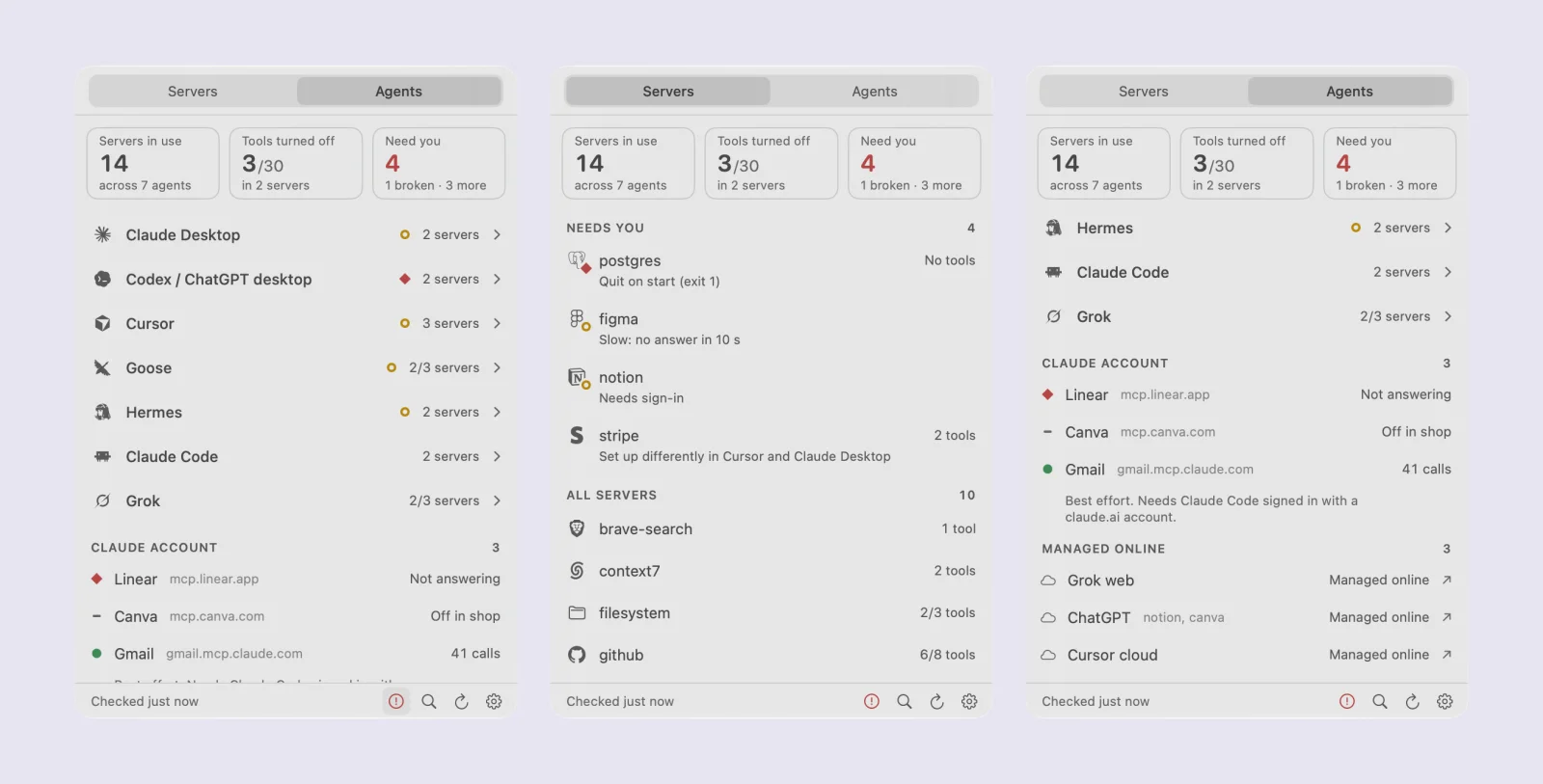
- A calmer top. Three tiles under the tabs: servers in use, tools turned off ("3/30"), and what needs you. With nothing to do, the third one is a quiet 0 with "all fine".
- One number per row. A server reads "5/7 tools", an agent "21/29 servers". The calls moved to the tooltip and the card.
- A new icon. Three stacked server units, the same shape as the menu bar mark, with its own dark and tinted looks.
- An icon for every server. Well-known servers get their own mono icon. For your own picture, drop
my-server.svg,.pdfor.pngin~/Library/Application Support/mcpock/ServerIcons/. - More switches. Servers can now be turned off and on in Cline, VS Code, Windsurf and Hermes profiles.
- Claude account connectors. Optional, in Settings > Agents: the claude.ai connectors get their own section with what Claude Code says about each. Off by default, because Claude Code starts its servers to answer.
- Agents managed online. Grok web, ChatGPT, Cursor cloud and Gemini keep their servers on their own sites, where mcpock can't check them. Each gets a row that opens its page.
- New widgets. A ring of all your servers, and a ring per agent with its logo inside.
- The panel opens on Agents, every time.
How to try it
Free and open source (MIT), for macOS 26 or later on Apple silicon. Signed and notarized, and it updates itself.
brew install --cask aka-kika/tap/mcpock
Or download it from mcpock.com. Already on an older version: it offers the update by itself. The full notes are in the 1.18.0 release notes.